

Directing an AI game builder has a rhythm problem. You describe a change, the AI gets to work — and for the next stretch it's heads-down: drawing art, composing audio, wiring up your game. Meanwhile you just thought of three more things. Until now, your options were to wait with your idea going stale, or interrupt everything and start over.
Not anymore. The MakePlay Studio now lets you keep talking while the AI keeps building — queue up your next thoughts to send automatically, or slip one into the work already in progress.
Queue it and walk away
While the AI is busy, the send button becomes a QUEUE button. Type your next idea, hit Enter, and it lines up neatly above the input box — first in, first out. The moment the AI finishes what it's doing, your queued messages fire off on their own, in order, as its next instructions.
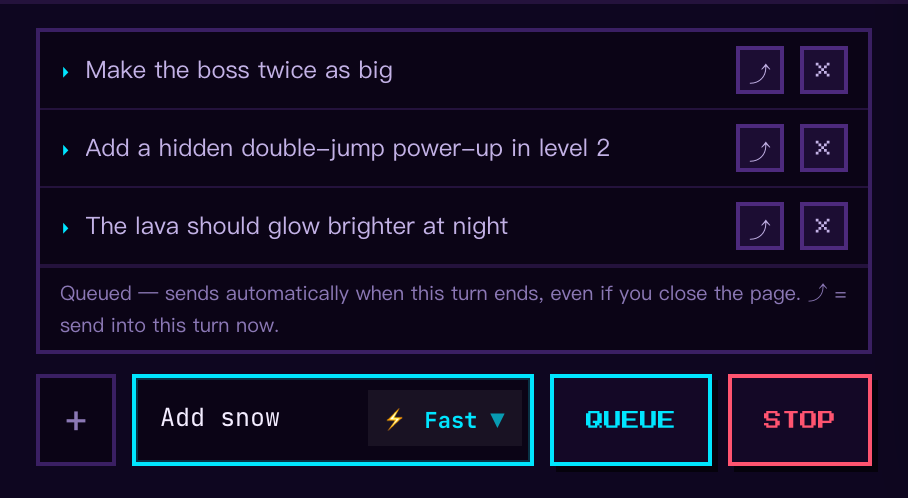
The queue lives with your game, not with your browser tab. Queue two ideas on your laptop, close the lid, head out — they'll still send when the AI wraps up, and when you open the same game on your phone later, the conversation has moved on exactly as if you'd stayed. Changed your mind about one? Hit × and it's gone before it ever sends.
Or jump the line
Some thoughts can't wait for the current build to finish — “actually, make the boss twice as big” is a lot more useful before the boss is done. Every queued message has a ⤴ button: press it, and instead of waiting its turn, the message is handed to the AI mid-build. It lands as soon as the AI finishes its current action, and the rest of the work continues with your new direction taken into account.
You'll see the jumped-in message appear in the chat as a ghosted bubble while it waits for its moment, then settle in as a regular message once the AI has picked it up — so you always know exactly what the AI has heard.
Small rules, no surprises
- Order is honored. Queued messages arrive in the order you wrote them, as separate messages — the AI reads them like a to-do list, not a jumble.
- Stop means stop. If you hit STOP on a build, your queued messages politely hold their fire — you probably stopped because you changed your mind. They stay in the queue, and you decide: send one with ⤴, remove it with ×, or just send something new and they'll follow.
- Five at a time. You can stack up to five messages per build — queued and jumped-in combined. Past that, let the AI catch up first; it's a collaborator, not a mailbox.
Why it matters
Game ideas don't arrive on schedule — they arrive while you watch the AI work, in the exact moment you see the draft take shape. Now the Studio catches them at full speed: nothing waits, nothing gets lost, and the AI is never interrupted unless you want it to be. Open the Studio, start a build, and keep the ideas coming.